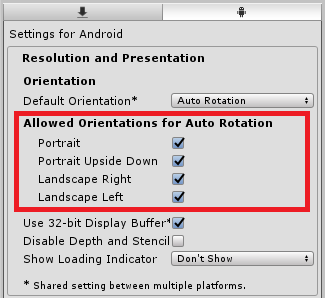
File → Build Settingsを開き Player Settingsをクリックします
その後 InspectorのResolution and Presentationの中にある
Allowed Orientations for Auto Rotationで 画面の向きを調整します
画面の固定
File → Build Settingsを開き Player Settingsをクリックします
その後 InspectorのResolution and Presentationの中にある
Allowed Orientations for Auto Rotationで 画面の向きを調整します
| Portrait | 縦向き |
| Portrait Upside Down | 縦向き(逆) |
| Landscape Right | 横向き(右) |
| Landscape Left | 横向き(左) |