オブジェクト取得
GameObject obj;
publicを付けてる場合 inspectorにオブジェクトを入れます
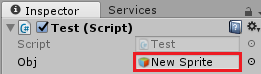
自身をスクリプトで習得する場合
GameObject obj = this.gameObject;
名前指定で習得する場合
GameObject obj = GameObject.Find ("オブジェクト名");
※Find文は処理が重たいので極力使わないようにしましょう
オブジェクトの取得と操作
オブジェクト取得
GameObject obj;
publicを付けてる場合 inspectorにオブジェクトを入れます
自身をスクリプトで習得する場合
GameObject obj = this.gameObject;
名前指定で習得する場合
GameObject obj = GameObject.Find ("オブジェクト名");
※Find文は処理が重たいので極力使わないようにしましょう
コンポーネントを取得する場合
Image image = obj.GetComponent<Image>();
Image Text TextAsset Sprite SpriteRenderer AudioSource
RectTransform を取得できます
スクリプトの取得も可能で、その場合は以下のようにします
Test test = obj.GetComponent<Test>();
これで「obj」オブジェクトの「Test」スクリプトを取得できるようになります
スクリプトを取得する場合
obj.GetComponent<スクリプト名>().取得したい要
素;
変数の取得やvoid コルーチンの実行ができます
スクリプト名 scr = this;
自身のスクリプトを取得したい場合はこれが使えます
指定位置のオブジェクトを取得する ※Collider 2D が必要
Collider2D obj =
Physics2D.OverlapPoint (new Vector2 (x, y));
これをゲームオブジェクトにする場合obj.gameObjectという風にする
何も無い所を指定した場合「null」を返す
オブジェクトの名前を取得する
obj.name;
オブジェクトの座標を取得する
Vector3 tmp = obj.transform.position;
uGUI用
Vector3 tmp = obj.transform.localPosition;
オブジェクトのレイヤー番号を取得する
obj.layer
オブジェクトのアクティブ状態を確認する
obj.gameObject.activeSelf
オブジェクトのアクティブ状態を変更する
obj.gameObject.SetActive(true);
当たり判定のアクティブ状態を変更する
obj.GetComponent<BoxCollider2D>().enabled = true;
オブジェクトを制作する
Instantiate (obj, new Vector3 (x,
y, z), Quaternion.identity);
親子関係にして制作する
Instantiate (obj, new
Vector3 (x, y, z), Quaternion.identity, this.transform);
制作したオブジェクトを取得する
GameObject obj2 = Instantiate (obj,
new Vector3 (x, y, z), Quaternion.identity);
オブジェクトを削除する
Destroy(obj);