スライダーの実装
GameObject → UI → Slider でスライダーを実装できます
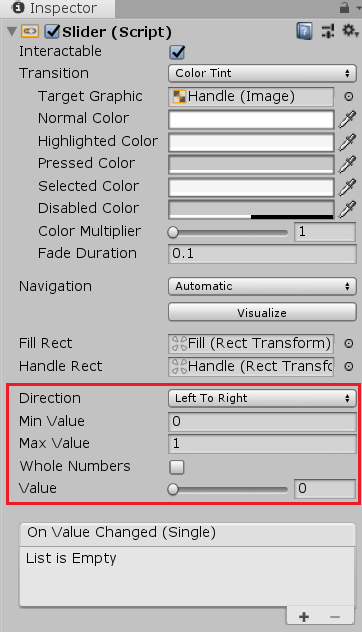
Direction
|
スライダーの向き
|
Min Value
|
スライダーの最小値
|
Max Value
|
スライダーの最大値
|
Whole Numbers
|
チェックを入れるとスライダーの値が整数だけになる
|
Value
|
スライダーの現在値
|
スライダーのスクリプト
以下のスクリプトを適当なオブジェクトに入れます
using System.Collections;
using System.Collections.Generic;
using UnityEngine;
using UnityEngine.UI;
public class SliderScript : MonoBehaviour
{
public Slider slider;
void Start()
{
//スライダーの最大値の設定
slider.maxValue = 1f;
}
public void OnSlider()
{
//スライダーの現在値の取得
Debug.Log(slider.value);
}
}
InspectorでSliderを入れます

On Click() の+をクリックし
Noneの所(左下)に手順2のスクリプトを入れたオブジェクトを入れ
No Function(右上)をSliderScript(スクリプト名)→OnSlider(メソッド名) と選択します

これでスライダーを動かすごとにOnSliderが呼び出されるようになります
ゲージを作る
こち
らで(別リンク)
戻る