文字を縦書きにする
using UnityEngine;
using System.Collections;
using UnityEngine.UI;
using UnityEngine.EventSystems;
using System.Collections.Generic;
using System.Linq;
[RequireComponent(typeof(Text))]
public class RotateText : UIBehaviour, IMeshModifier
{
private Text textComponent;
private string text = null;
private char[] characters;
// 回転させない文字群
[SerializeField] private List<char>
NonRotatableCharacters;
[SerializeField] static int ShiftChar = 0;
[SerializeField] private char[]
ShiftCharacters = new char[ShiftChar];
[SerializeField] private float[] ShiftXPixels
= new float[ShiftChar];
[SerializeField] private float[] ShiftYPixels
= new float[ShiftChar];
void Update()
{
if (textComponent ==
null)
{
textComponent = this.GetComponent<Text>();
}
else
{
if (textComponent.text != "")
{
if (textComponent.text != text)
{
text = textComponent.text;
var graphics = base.GetComponent<Graphic>();
if (graphics != null)
{
graphics.SetVerticesDirty();
}
}
}
}
}
void OnValidate()
{
textComponent =
this.GetComponent<Text>();
if
(textComponent.text != null && textComponent.text != "")
{
if (textComponent.text != text)
{
text = textComponent.text;
var graphics = base.GetComponent<Graphic>();
if (graphics != null)
{
graphics.SetVerticesDirty();
}
}
}
}
public void ModifyMesh(Mesh mesh) { }
public void ModifyMesh(VertexHelper verts)
{
if (!this.IsActive())
{
return;
}
List<UIVertex>
vertexList = new List<UIVertex>();
verts.GetUIVertexStream(vertexList);
ModifyVertices(vertexList);
verts.Clear();
verts.AddUIVertexTriangleStream(vertexList);
}
void ModifyVertices(List<UIVertex>
vertexList)
{
if (textComponent !=
null)
{
if (textComponent.text != null && textComponent.text !=
"")
{
characters = textComponent.text.ToCharArray();
if (characters.Length == 0)
{
return;
}
for (int i = 0, vertexListCount = vertexList.Count; i <
vertexListCount; i += 6)
{
int index = i / 6;
//文字の回転の制御
if (!IsNonrotatableCharactor(characters[index]))
{
var center = Vector2.Lerp(vertexList[i].position, vertexList[i +
3].position, 0.5f);
for (int r = 0; r < 6; r++)
{
var element = vertexList[i + r];
var pos = element.position - (Vector3)center;
var newPos = new Vector2(
pos.x * Mathf.Cos(90 * Mathf.Deg2Rad) - pos.y * Mathf.Sin(90 *
Mathf.Deg2Rad),
pos.x * Mathf.Sin(90 * Mathf.Deg2Rad) + pos.y * Mathf.Cos(90 *
Mathf.Deg2Rad)
);
element.position = (Vector3)(newPos + center);
vertexList[i + r] = element;
}
}
//文字の位置の制御
float[] shiftPixel = GetPixelShiftCharactor(characters[index]);
if (shiftPixel[0] != 0 || shiftPixel[1] != 0)
{
var center = Vector2.Lerp(vertexList[i].position, vertexList[i +
3].position, 0.5f);
for (int r = 0; r < 6; r++)
{
var element = vertexList[i + r];
Debug.Log("before:" + element.position.x + "," +
element.position.y);
var pos = element.position - (Vector3)center;
var newPos = new Vector2(
pos.x + shiftPixel[0],
pos.y + shiftPixel[1]
);
element.position = (Vector3)(newPos + center);
Debug.Log("after:" + element.position.x + "," +
element.position.y);
vertexList[i + r] = element;
}
}
}
}
}
}
bool IsNonrotatableCharactor(char character)
{
return
NonRotatableCharacters.Any(x => x == character);
}
float[] GetPixelShiftCharactor(char
character)
{
int index =
System.Array.IndexOf(ShiftCharacters, character);
float[] pixel = new
float[2];
if (0 <= index
&& index < ShiftXPixels.Length && index <
ShiftYPixels.Length)
{
pixel[0] = ShiftXPixels[index];
pixel[1] = ShiftYPixels[index];
}
return pixel;
}
}
上記のスクリプトを縦書きにしたいTextに入れます
※Value cannot be nullと言うエラーが出ますが無視して構いません
もし上手くいかない場合はデータを保存したり
Textやスクリプトの表示・非表示を何度か切り替えると動きます
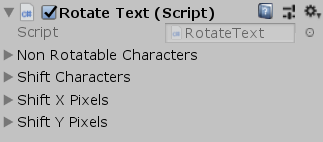
| Non Rotatable Characters |
回転させない文字を入力します
|
Shift Characters
|
移動させたい文字を入力します
|
Shift X Pixels
|
Shift Charactersに入力した文字のX軸を移動させます |
| Shift Y Pixels |
Shift Charactersに入力した文字のY軸を移動させます |
戻る