オブジェクトの移動
オブジェクトの移動にはオブジェクトの取得
それと Rigidbody 2D が必要です
Rigidbody 2DはAdd Component→Physics 2D→Rigidbody 2Dを選択すれば入れられます
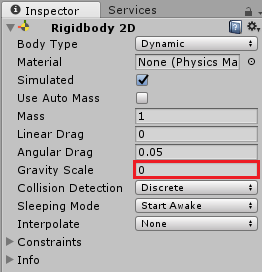
※この時 Gravity Scaleを0にするのを忘れないようにしましょう
オブジェクトの向きを変える(uGUIでも使用可能)
this.gameObject.transform.eulerAngles
= new Vector3 (float x, float y, float z);
オブジェクトのサイズを変える(uGUIでも使用可能)
this.gameObject.transform.localScale
= new Vector3 (float x, float y, float z);
移動座標を指定して そこにオブジェクトを瞬間移動する
this.gameObject.transform.position
= new Vector3(float x, float y, float z);
uGUI用
this.gameObject.transform.localPosition
= new Vector3 (float x, float y, float z);
指定速度でオブジェクトを回転する
this.gameObject.transform.Rotate
(new Vector3 (float x, float y, float z));
移動座標を指定して そこにオブジェクトを平行移動する
this.gameObject.transform.position
= Vector2.MoveTowards(transform.position , new Vector2(x,y),
speed*Time.deltaTime);
※speedには 移動の速度を入力する
現在座標からx,y,zを足した位置に瞬間移動する
this.gameObject.transform.Translate(float
x, float y, float z);
※オブジェクトが回転すると 移動方向も変わる
this.gameObject.transform.Translate(float
x, float y, float z, Space.World);
※オブジェクトが回転しても 移動方向は変わらない
現在座標からx,y,zを足した位置に平行移動する
this.gameObject.transform.Translate(new
Vector2(float x, float y));
※オブジェクトが回転すると 移動方向も変わる
this.gameObject.transform.position
+= new Vector3 (float x, float y, float z);
※オブジェクトが回転しても 移動方向は変わらない
戻る